How to control user access and create entry codes with the Qolsys IQ2/IQ4 security systems.
Manage Users and Codes
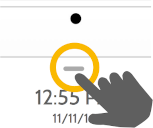
Step 1
Swipe down to access settings tray
Step 2
Touch “SETTINGS”
Step 3
Touch “ADVANCED SETTINGS”
Step 4
Enter your master code
Step 5
Touch “User Management”Here you will find a list of all current users. You can change user codes and user capabilities.
Existing users
User Types
Master: Access panel functions, camera, and system settings.
User: Access panel functions, camera, but NOT system settings.
Guest: Used to give arm and disarm access to those users who will use the panel on a temporary basis
Expiration Date: Choose a specific date that will disable a user code automatically.
Adding a User
Add User Screen
Once on the “Add User” screen, you can create a custom name and user code and indicate whether you want this person to be a Master, User, or Guest.